Overview
This document details the lab exercises and demonstrations that comprise the hands-on component of the BIG-IQ v6.0. The environment is setup with basic configuration and associated traffic generation to populate dashboards for easy demos. Additional configuration can be added to support items that are not currently covered.
This lab environment is designed to allow for quick and easy demos of a significant portion of the BIG-IQ product. The Linux box in the environment has multiple cron jobs that are generating traffic that populates the monitoring tab.
Infrastructure
F5® BIG-IQ:sup:® Centralized Management is a platform that you use as a tool to help you manage BIG-IP® devices and all of their services (such as LTM®, AFM®, ASM®, and so forth), from one location. BIG-IQ can manage up to 600 (physical, virtual, or vCMP®) BIG-IP devices and handle licensing for up to 5,000 unmanaged devices.
Using BIG-IQ helps you more efficiently manage your BIG-IP devices. That means you and your co-workers don’t have to log in to individual BIG-IP systems to get your job done. Instead, you can discover, upgrade, deploy policy changes, manage licenses, and more, from just one place.
From BIG-IQ, you can manage a variety of tasks from software updates to health monitoring, and traffic to security. And because permissions for users are role-based, you can limit access to just a few trusted administrators to minimize downtime and potential security issues. You can also allow users to view or edit only those BIG-IP objects that they need to do their job.
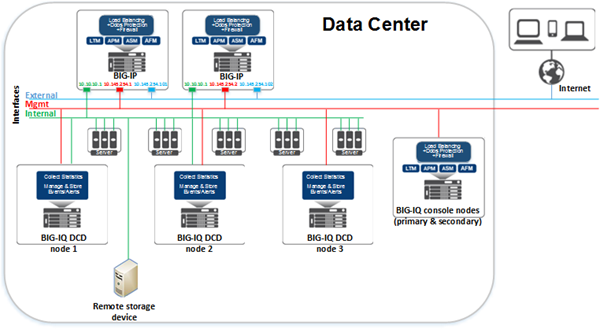
An F5® BIG-IQ:sup:® Centralized Management solution can involve a number of different elements. The topology for these elements depends on your needs, and on whether you include data collection devices (DCDs) in your solution. A typical solution can include the following elements:
- BIG-IQ system(s)
- BIG-IP devices
- Data collection devices (optional)
- Remote storage devices
Note
We recommend that all work for this lab be performed from your local Web browser or from the windows jumphost. No installation with your local system is required.
BIG-IQ Centralized Management system
Using BIG-IQ Centralized Management, you can centrally manage your BIG-IP® devices, performing operations such as backups, licensing, monitoring, and configuration management. And because access to each area of BIG-IQ is role-based, you can limit access to users, thus maximizing work flows while minimizing errors and potential security issues.
BIG-IP device
A BIG-IP device runs a number of licensed components that are designed around application availability, access control, and security solutions. These components run on top of F5® TMOS:sup:®. This custom operating system is an event-driven operating system designed specifically to inspect network and application traffic, and make real-time decisions based on the configurations you provide. The BIG-IP software runs on both hardware and virtualized environments.
Data collection device
A data collection device (DCD) is a specially provisioned BIG-IQ system that you use to manage and store alerts, events, and statistical data from one or more BIG-IP systems.
Configuration tasks on the BIG-IP system determine when and how alerts or events are triggered on the client. The alerts or events are sent to a data collection device in a BIG-IQ Centralized Management deployment, and the BIG-IQ system retrieves them for your analysis. When you opt to collect statistical data from the BIG-IP devices, the DCD periodically retrieves those statistics from your devices, and then processes and stores that data.
The group of data collection devices and BIG-IQ systems that work together to store and manage your data are referred to as the data collection cluster. The individual data collection devices are generally referred to as nodes.
Remote storage device
You need a remote storage device only when your deployment includes a data collection device (DCD) and you plan to store backups of your events, alerts, and statistical data for disaster recovery requirements. You also need remote storage so that you can retain this data when you upgrade your software.
Network environment for simple device management and configuration
To deploy a simple device management and configuration environment, all you need is one or more BIG-IQ® systems and the BIG-IP® devices that you want to manage. The number of BIG-IQ systems you need depends on how much redundancy your business requires. A second system provides high availability failover capability.
The simple management and configuration solution uses a single management network. The BIG-IQ system uses traffic on the management network to do these things:
- Enable bidirectional traffic between the BIG-IQ systems and the BIG-IP devices.
- Enable traffic between the BIG-IQ systems. If you use a secondary high availability BIG-IQ system, this traffic keeps the state information synchronized.
- Provide access to the BIG-IQ user interface. You can also use the management network to access the BIG-IQ system using SSH if you need to run manual commands.
Note: The number of devices of each type that will best meet your company’s needs depends on a number of factors. Refer to the F5 BIG-IQ Centralized Management: Data Collection Device Sizing Guide on support.f5.com for details.
This figure illustrates the network topology required for a simple management and configuration deployment.
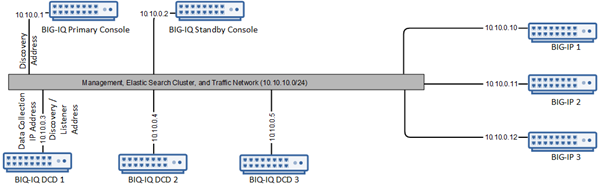
In this lab, we will only deploy one DCD and one BIG-IQ CM Console.
Device Information
Management
Network 10.1.1.0/24
BIGIQ_CM_v6.0.0-0.0.1591 10.1.1.4 primary
SEA-vBIGIP01.termmarc.com.v13.1.0.5 (VPN) 10.1.1.7 primary
BOS-vBIGIP01.termmarc.com.v13.1.0.5 10.1.1.8 primary
BOS-vBIGIP02.termmarc.com.v13.1.0.5 10.1.1.10 primary
BIGIQ_DCD_v6.0.0-0.0.1591 10.1.1.6 primary
Ubuntu 16.04 Lamp Server, Radius and DHCP 10.1.1.5 primary
Subnet 10 (External)
Network 10.1.10.0/24
BOS-vBIGIP01.termmarc.com.v13.1.0.5 10.1.10.8 primary, 10.1.10.18
SEA-vBIGIP01.termmarc.com.v13.1.0.5 (VPN) 10.1.10.7 primary
Ubuntu 16.04 Lamp Server, Radius and DHCP 10.1.10.5 primary
BIGIQ_CM_v6.0.0-0.0.1591 10.1.10.4 primary
BIGIQ_DCD_v6.0.0-0.0.1591 10.1.10.6 primary
BOS-vBIGIP02.termmarc.com.v13.1.0.5 10.1.10.10 primary, 10.1.10.19
Subnet 20 (Internal)
Network 10.1.20.0/24
BOS-vBIGIP01.termmarc.com.v13.1.0.5 10.1.20.8 primary, 10.1.20.18
SEA-vBIGIP01.termmarc.com.v13.1.0.5 (VPN) 10.1.20.7 primary
Ubuntu 16.04 Lamp Server, Radius and DHCP 10.1.20.5 primary, 10.1.20.110-145
BIGIQ_CM_v6.0.0-0.0.1591 10.1.20.4 primary
BIGIQ_DCD_v6.0.0-0.0.1591 10.1.20.6 primary
BOS-vBIGIP02.termmarc.com.v13.1.0.5 10.1.20.10 primary, 10.1.20.19
The BIG-IQ User Interface
In this section, we will go through the main features of the user interface. Feel free to log into the BIG-IQ device to explore some of these features in the lab.
After you log into BIG-IQ, you will notice:
- A navigation tab model at the top of the screen to display each high level functional area.
- A tree based menu on the left-hand side of the screen to display low-level functional area for each tab.
- A large object browsing and editing area on the right-hand side of the screen.
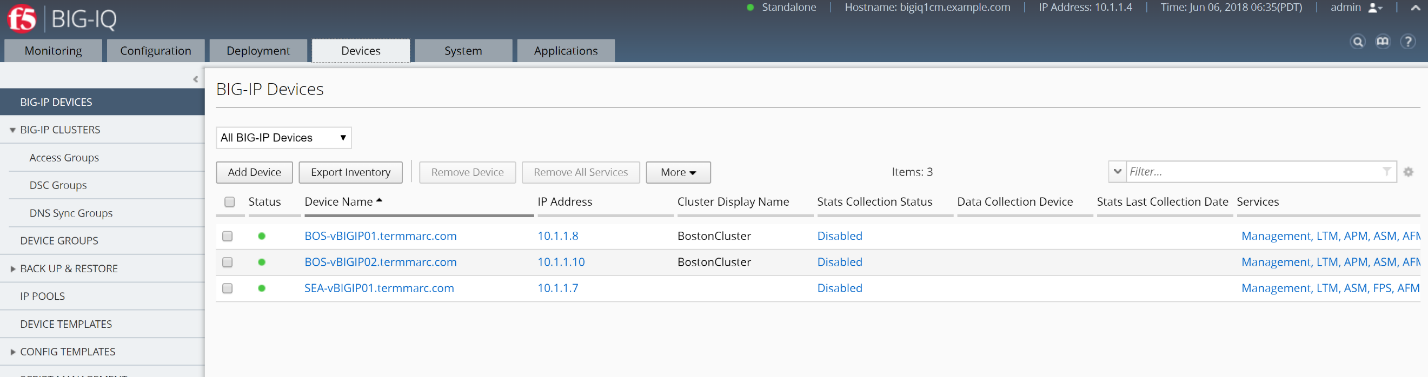
- Let us look a little deeper at the different options available in bar at the top of the page.
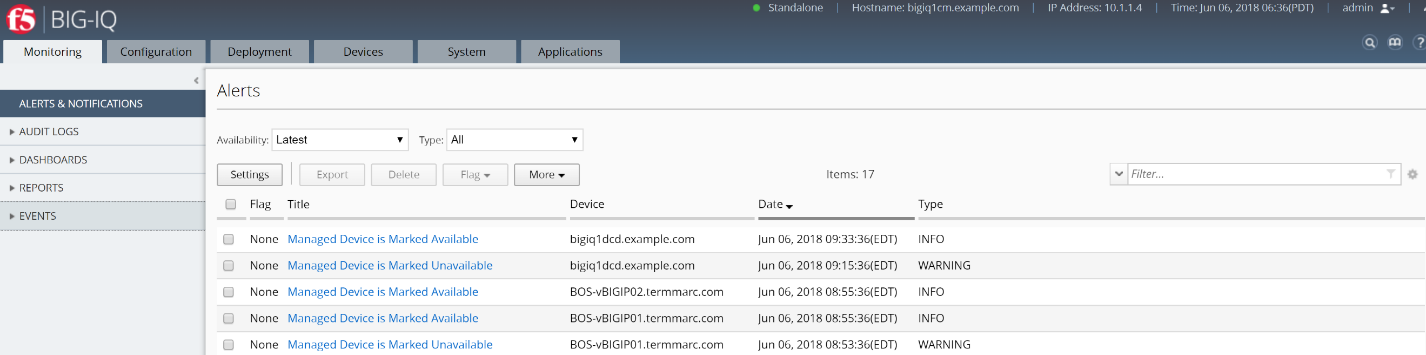
- At the top, each tab describes a high-level functional area for BIG-IQ central management:
- Monitoring –Visibility in dashboard format to monitor performance and isolate fault area.
- Configuration – Provides configuration editors for each module area.
- Deployment – Provides operational functions around deployment for each module area.
- Devices – Lifecycle management around discovery, licensing and software install / upgrade.
- System – Management and monitoring of BIG-IQ functionality.
- Applications – Visibility for all of the components of the application.
BIG-IQ Data Collection Devices (DCD)
To manage the data generated by BIG-IP® devices on BIG-IQ® Centralized Management, you deploy a network of devices called a data collection device (DCD) or a cluster, and then configure that device or cluster to meet your business needs.
The BIG-IQ® data collection device runs as a virtual machine in supported hypervisors, or on the BIG-IQ 7000 series platform. You license the data collection device (DCD) using the base registration key.
Using BIG-IQ Centralized Management, you can discover a data collection device (DCD) and add it to the Logging Group, where the BIG-IQ system can access its data. You can then receive data from multiple BIG-IP systems. This unified view makes browsing easier, and provides a complete view of application alert or event activity and statistics data.
For the purposes of this lab the Data Collection Device has already been deployed, discovered and activated by the BIG-IQ CM. This data collection device collects the data generated by the configured BIG-IP systems. Thus, BIG-IQ provides a single view of all alert or event entries and statistics data.
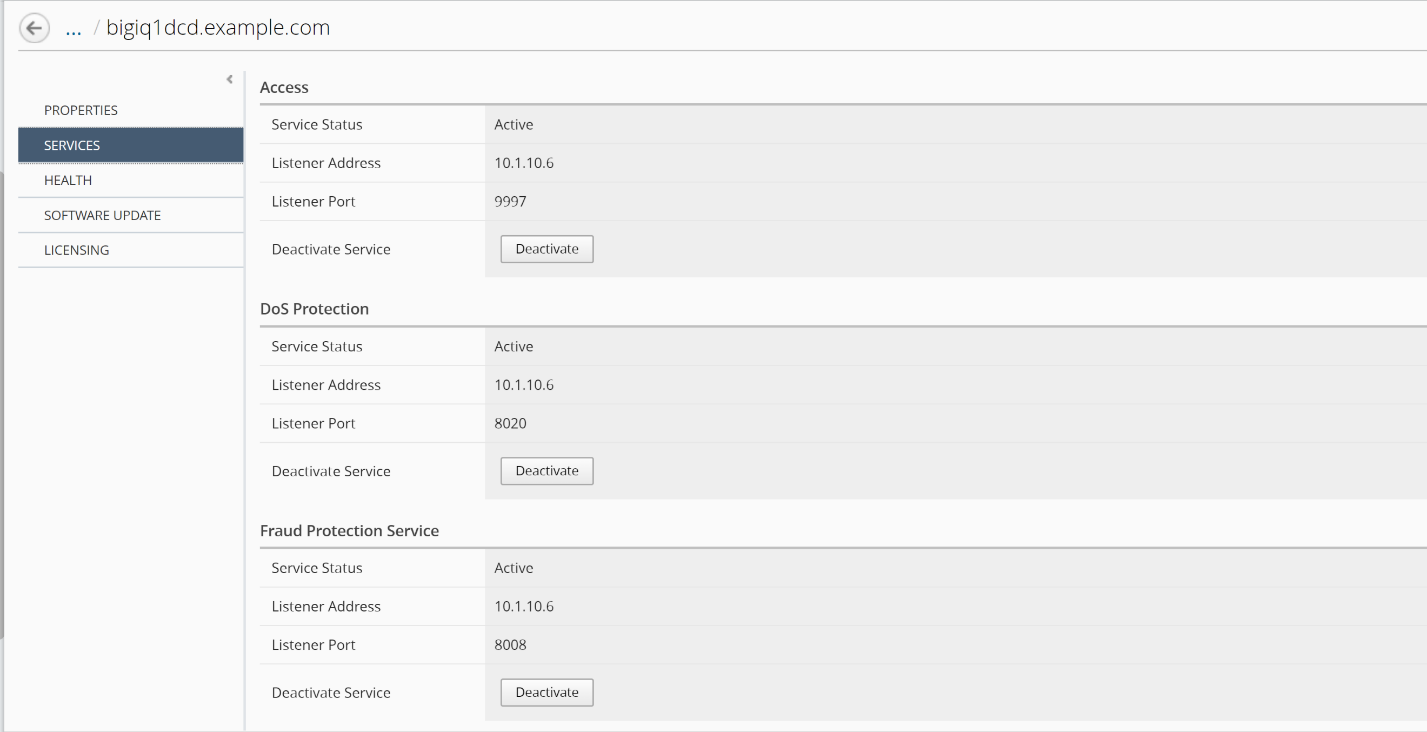
Click on System tab on the top, then BIG-IQ DATA COLLECTION on the left, click on BIG-IQ Data Collection Devices.
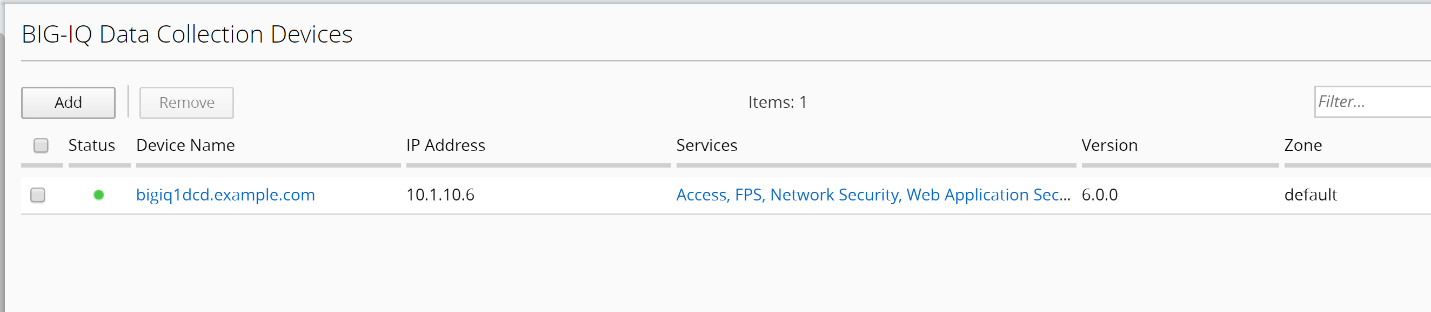
Click on the device name link and review the detailed settings of the DCD. Browse through Services to review the list of service modules that are activated on this data collection device.