Getting Started
Please follow the instructions provided by the instructor to start your lab and access your jump host.
Note
All work for this lab will be performed exclusively from the Windows jumphost. No installation or interaction with your local system is required.

Overview
This document details the lab exercises and steps that should be followed by the student to learn about BIG-IQ Access specific functions as they relate to managing BIG-IP Access Policy Manager.
The environment is setup with basic configuration and associated traffic generation to populate dashboards for these exercises. BIG-IQ could be managing BIG-IPs in Azure and Google Cloud, as well as on premises for example. This can be a powerful management tool for customers that are talking about multi-cloud management.
Introduction
This lab environment is designed to allow for quick and easy demonstration of a significant portion of the BIG-IQ product. The Linux box in the environment has multiple cron jobs that are generating traffic that populates the monitoring tab.
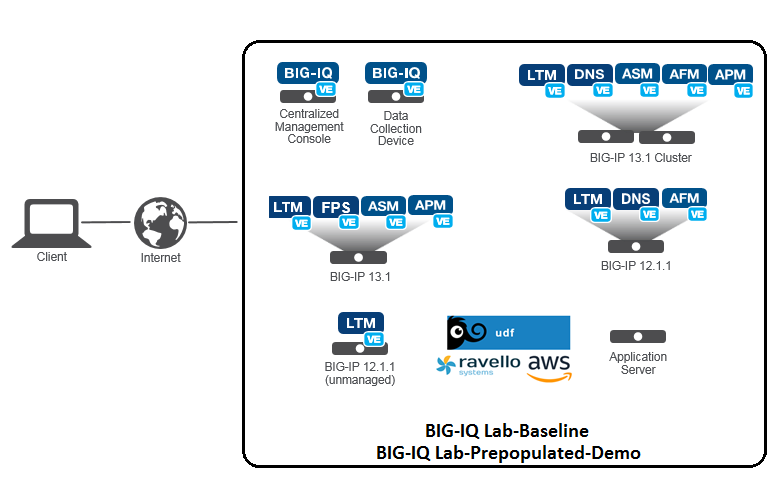
Device Information
| Device Name | Mgmt IP | Version | Username/pw | Provisioning |
|---|---|---|---|---|
| BIGIQ_CM_5.4 | 10.1.1.4 | 5.4.0 | admin/admin root/default |
BIG-IQ Console |
| BIGIQ_DCD_5.4 | 10.1.1.6 | 5.4.0 | admin/admin root/default |
BIG-IQ Data Collection Device |
| BOS-vBIGIP01.termmarc.com | 10.1.1.10 | 13.1.0 | admin/admin root/default |
LTM, DNS, ASM, AFM, APM |
| BOS-vBIGIP02.termmarc.com | 10.1.1.11 | 13.1.0 | admin/admin root/default |
LTM, DNS, ASM, AFM, APM |
| ip-10-1-1-7.us-west-2.compute.internal | 10.1.1.7 | 12.1.1 HF1 | admin/admin root/default |
LTM, DNS, AFM |
| ip-10-1-1-8.us-west-2.compute.internal | 10.1.1.8 | 13.1.0 | admin/admin root/default |
LTM, FPS, ASM, APM |
| ip-10-1-1-9.us-west-2.compute.internal | 10.1.1.9 | 12.1.1 HF1 | admin/admin root/default |
LTM, DNS, AFM |
| Lamp-Server | 10.1.1.5 | CentOS 7 (UDF) Ubuntu (Ravello) | root/default centos/default |
App Server, LDAP, Radius, TACACS+, syslog |
Dependencies
- The BIG-IP device must be located in your network.
- The BIG-IP device must be running a compatible software version.
- Enable basic authentication on BIG-IQ using set-basic-auth on in the shell.
BIG-IP Versions AskF5 SOL with this info:
https://support.f5.com/kb/en-us/solutions/public/14000/500/sol14592.html
Note: Port 22 and 443 must be open to the BIG-IQ management address, or any alternative IP address used to add the BIG-IP device to the BIG-IQ inventory.
How to access the lab in the Ravello environment
Agility Lab specific instructions.
For indivual access take the following steps:
Ravello:
Once the Instructor has started your Lab environment you will be provided a URL/IP Address to access the environments Jump Host where you will perform all the Lab Tasks.
The BIG-IQ User Interface
In this section, we will go through the main features of the user interface. Feel free to log into the BIG-IQ device to explore some of these features in the lab.
After you log into BIG-IQ, you will notice:
- A navigation tab model at the top of the screen to display each high level functional area.
- A tree based menu on the left-hand side of the screen to display low-level functional area for each tab.
- A large object browsing and editing area on the right-hand side of the screen.
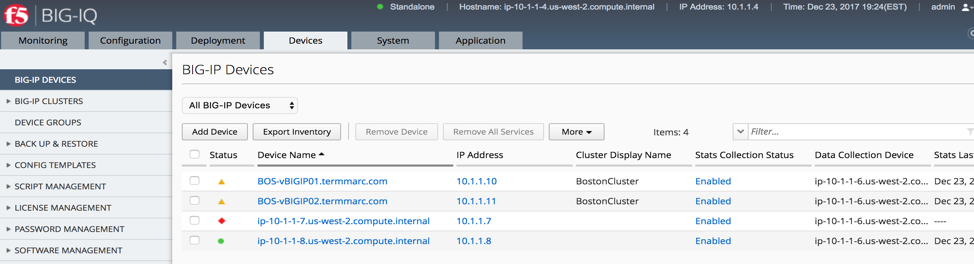
- Let us look a little deeper at the different options available in bar at the top of the page.
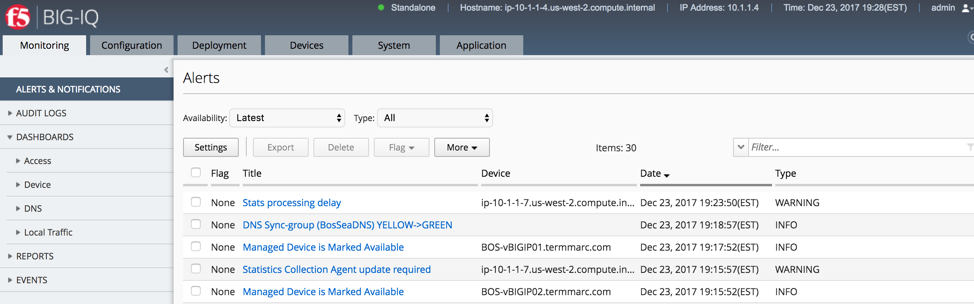
- At the top, each tab describes a high-level functional area for BIG-IQ central management:
- Monitoring –Visibility in dashboard format to monitor performance and isolate fault area.
- Configuration – Provides configuration editors for each module area.
- Deployment – Provides operational functions around deployment for each module area.
- Devices – Lifecycle management around discovery, licensing and software install / upgrade.
- System – Management and monitoring of BIG-IQ functionality.
- Application – Visibility for all of the components of the application.
- Overview of left hand navigation for each top-level functional area.
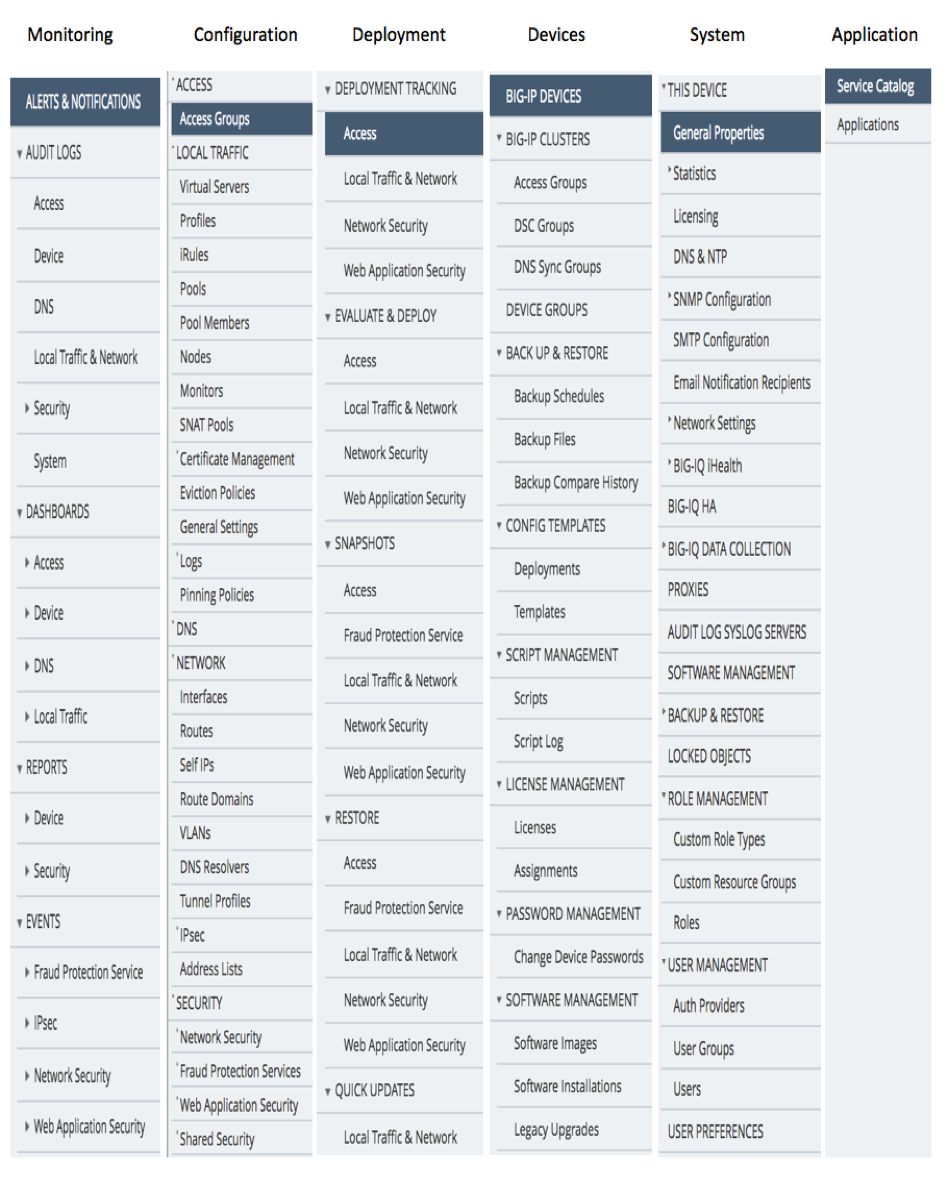
Note:
This Course is not intended to train you on the general device management functions of BIG-IQ but rather to train you on the features available within the Access portion of BIG-IQ for managing BIG-IP Access Policy Manager module on multiple BIG-IPs throughout your organization. Therefore we will jump right into the BIG-IQ Access specific related workflows. Toward the end of the lab we will discuss what steps an Admin must take in order to discover and import a BIG-IP device running Access Policy Manager so that it can be managed by BIG-IQ.