Module 2: Application Templates & Deployment
In this module, we will learn how to use Application Templates and how to deploy an Application.
The Application Templates will be created by marco, the Administrator. larry will create the security policies and let Marco know about the ones to associate with the templates. Once the template is ready with all the necessary information, it will be ready to use by the Application owner.
paula needs to deploy an application, she has multiple Application servers. At this time, she needs to test the performance of her application, she also wants to make her application secure before staging it to production. She connects to the BIG-IQ and has access to her Application Dashboard. paulauses the application template created by Marco to deploy her Application.
After a week of testing her application (in the class ~5 min), she will ask larry to fine tune and validate the learning done by the Application Firewall (BIG-IP ASM).
Note
A traffic generator located on the Ubuntu Lamp Server, LDAP and DHCP server, is sending good traffic every minute to the virtual servers.
Once the security policy is tuned and validated, paula will enforce blocking mode in the policy.
Finally, we will simulate “bad” traffic to show the security policy blocking it.
Note
A traffic generator located on the Ubuntu Lamp Server, LDAP and DHCP server, can be launched manually to send bad traffic to the virtual servers.
Built-in templates
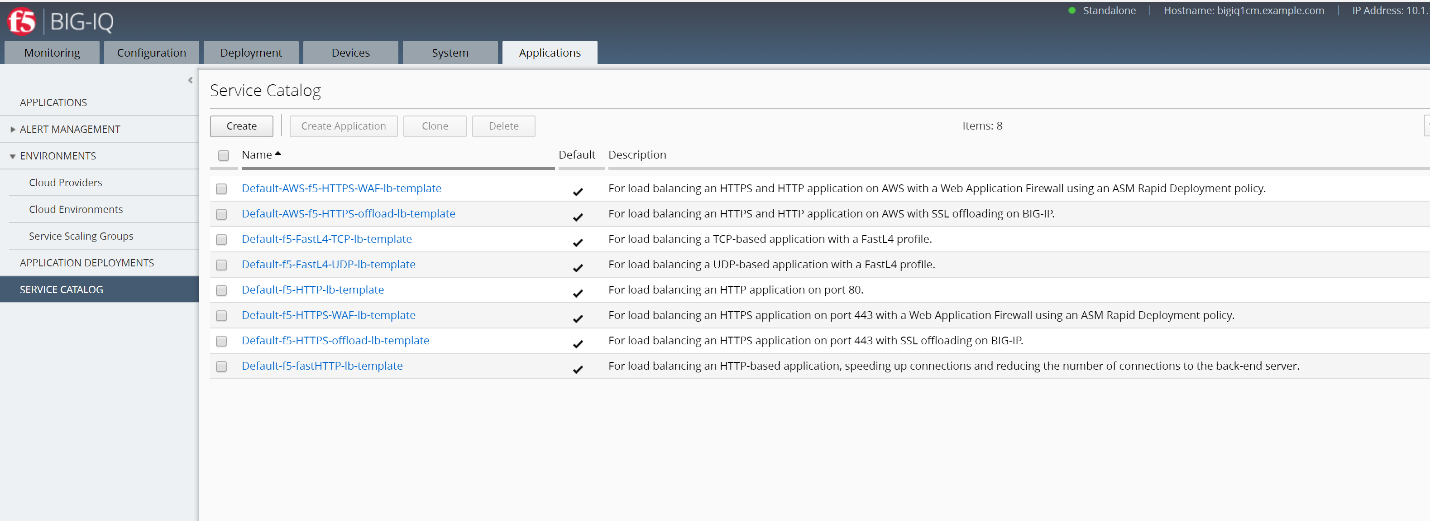
BIG-IQ v6.0 will have the default templates below built-in. These default templates cannot be modified but they can be cloned. They can be used to deploy various type of applications. These default templates are only displayed after BIG-IQ is managing a BIG-IP device.
- Default-AWS-f5-fastHTTP-lb-template: For load balancing an HTTP-based application, speeding up connections and reducing the number of connections to the back-end server. (only for AWS)
- Default-AWS-f5-HTTPS-WAF-lb-template: For load balancing an HTTPS application on port 443 with a Web Application Firewall using an ASM Rapid Deployment policy. (only for AWS)
- Default-f5-FastL4-TCP-lb-template: For load balancing a TCP-based application with a FastL4 profile.
- Default-f5-FastL4-UDP-lb-template: For load balancing a UDP-based application with a FastL4 profile.
- Default-f5-HTTP-lb-template: For load balancing an HTTP application on port 80.
- Default-f5-fastHTTP-lb-template: For load balancing an HTTP-based application, speeding up connections and reducing the number of connections to the back-end server.
- Default-f5-HTTPS-WAF-lb-template: For load balancing an HTTPS application on port 443 with a Web Application Firewall using an ASM Rapid Deployment policy.
- Default-f5-HTTPS-offload-lb-template: For load balancing an HTTPS application on port 443 with SSL offloading on BIG-IP.
- ..Warning::
- Templates with virtual servers without a HTTP profiles can not be depoyed to a Service Scaling Group
Connect as marco, go to Applications > SERVICE CATALOG:
Look through the different default templates.